Account and security
Plans, billing and usage limits
Understand your plan, term, included features and usage limits.
Who can manage the subscription
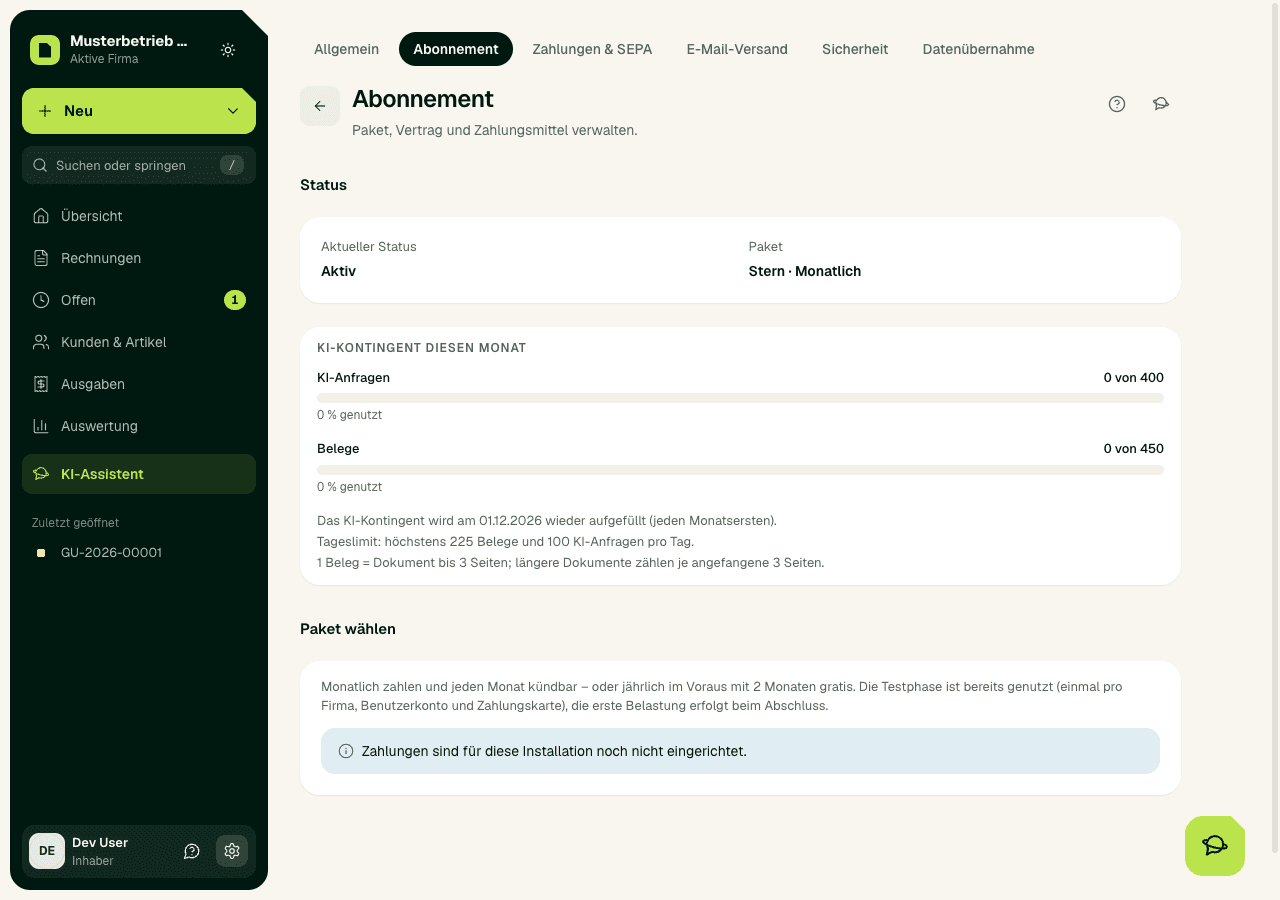
Only the owner of a company can open or change the SoPasst subscription. Open Settings › Subscription (the gear at the bottom of the sidebar). There you see the current status, the end of the trial and the next charge.
Plan overview
Voice drafts (an invoice or quote by voice) come with Stern and Galaxie: 150 and 300 per month, each recording up to 3 minutes. Each voice draft also counts as one AI request.
Accepted members and open invitations count as users. Every plan also has one extra seat for your tax advisor (role “Tax adviser / bookkeeping”) free of charge. If, after a plan change, your team has more users than the new plan includes, everyone keeps their access; new people can only join once a seat is free again.
- Komet: 1 user, 50 documents and 100 AI requests per month. It includes all document types, the basic reports, manual payment entry and one data transfer by CSV or from KingBill.
- Planet: 3 users, 200 documents and 200 AI requests per month. It also includes data imports as often as you need, also from sevDesk and Invoice Ninja, the tax-advisor ZIP with BMD Fleximport, roles and access rights, agent access (MCP) for AI assistants, and the API and webhooks with 5,000 requests and 300 API documents per month.
- Stern: 7 users, 450 documents and 400 AI requests per month. It also includes secure sending to your tax advisor and an API quota of 50,000 requests and 3,000 API documents per month.
- Galaxie: 15 users, 900 documents and 800 AI requests per month. All plan features offered at the moment are included, plus 500,000 API requests and 10,000 API documents per month.
Prices and terms
What SoPasst costs depends on the plan and how you pay. All prices are plus VAT (USt). You pay for every plan monthly or yearly; at the top of the pricing page you switch between the two ways of paying, and below it you find all plans side by side. Before you complete the purchase on the payment page, always check the plan, way of paying, tax, total amount and which company it is for. The summary shown there is what counts for your actual purchase.
Introductory price until 31.12.2026: the prices above apply to subscriptions booked by 31.12.2026. After that, new subscriptions cost €9 for Komet, €24 for Planet, €49 for Stern and €89 for Galaxie per month (yearly €90, €240, €490 and €890). Book by then and you keep your price for the booked plan and billing term for as long as the subscription runs without a break; a change of plan or billing term takes the price of the day you change (AGB § 5 Abs. 4a).
Whichever way you pay, there is no minimum term, and a running subscription does not get more expensive when the introductory price ends. SoPasst announces any other price change by e-mail at least two months in advance; you can then cancel for that date (AGB § 5 Abs. 4).
- Monthly: Komet €7, Planet €19, Stern €39 and Galaxie €79 per month. You can cancel this option for the end of each monthly period.
- Yearly in advance: Komet €70, Planet €190, Stern €390 and Galaxie €790 per year, so ten monthly prices for twelve months – 2 months free (equivalent to €5.83, €15.83, €32.50 and €65.83 per month). You can cancel for the end of the paid year.
Trial and first payment
The trial is available once per company, user account and payment card. If another company of your user account already had a trial, the payment page shows the amount due right away. If the card was already used for a trial, SoPasst charges nothing after the payment page and starts no subscription; under Settings › Subscription you then choose a plan again, without a trial.
- On the pricing page, choose monthly or yearly and then a plan.
- Sign in or create a user account.
- Enter your payment method on the secure payment page. SoPasst does not store any card details.
- Use everything in the chosen plan for 14 days free. Card required, first charge on day 15, cancel any time before. Checkout names the exact date before you confirm; afterwards it is under Settings › Subscription. During the trial, the AI has the allowance of Komet on every plan: 50 documents and 100 AI requests per month, plus 30 voice drafts on Stern and Galaxie. After that, your plan's allowance applies.
- End the subscription before the trial is over if you do not want to go on with a paid plan. Then there is no first charge.
Money-back guarantee
After the first successful payment, a voluntary 14-day money-back guarantee also applies. If the refund is offered in the Subscription area, you can ask for the full refund there. Once the refund has gone through, access ends at once. Your statutory rights are not affected.
Change plan or payment method
On a running subscription you change the plan yourself: open Settings › Subscription and click Switch on the plan you want (Komet, Planet, Stern or Galaxie). A page of its own shows the current and the new plan with their prices, when the change applies and what is charged today; nothing changes until you confirm.
A discount code on your subscription keeps running through a plan change, with its original duration. Only a discount that explicitly covers one particular plan ends with the change; the review page points this out. To change how you pay (monthly or yearly), e-mail SoPasst; you find the link under Settings › Subscription.
You still manage your payment method and invoices through Manage payments & invoices. There you see your invoices and change your payment method; the portal does not offer plan changes. You also cancel there: monthly subscriptions and those paid yearly in advance end at the end of their billing period. While a smaller plan is booked, cancelling in the portal is blocked: withdraw the change first, or cancel informally by e-mail.
- Larger plan: applies at once (AGB § 2a Abs. 5). For the rest of the paid period only the prorated difference is charged; after that you pay the new price on the usual date.
- Smaller plan: applies from the end of the paid period, i.e. the end of the month or of the paid year. Until then you keep using your current plan; nothing is refunded. Until then you can take the booked change back under Settings › Subscription with Withdraw change.
- During the trial every change applies at once and is free.
Cancel the subscription
The owner can cancel at any time, without giving a reason and without a minimum term:
The subscription ends at the end of the paid period, that is at the end of the month or of the paid year; until then you keep working as usual. If you cancel during the trial, nothing is charged. If a smaller plan is scheduled, undo the change first or cancel informally by e-mail. After the end, your issued documents (PDF), the data exports and the Steuerberater package stay available (see Understanding the billing status). If you only want to pay less, switch to a smaller plan instead of cancelling (see Change plan or payment method).
- Open Settings › Subscription.
- Click Manage payments & invoices. The secure payment page opens.
- Choose to cancel the subscription there and confirm.
Understanding the billing status
- No subscription: No subscription has been activated for the company yet.
- Trial: Everything in the plan is active; the date shown is when the trial without charge ends.
- Active: The subscription is paid and ready to use.
- Payment overdue: A charge has failed. SoPasst is locked until the open invoice is paid under Manage payments & invoices or the payment method is updated. After that, access is unlocked again automatically.
- Cancelled: A cancellation takes effect at the end of the paid period; until then the subscription stays active, and after that SoPasst is locked.
- Unpaid, expired or paused: SoPasst is locked. Sort out the payment in the customer portal or choose a new plan.
- Locked: Only the owner can pay; other users see a notice. Issued documents (PDF), data exports, the tax-advisor package of the last paid plan, the security settings and the request to delete your data stay available.
Usage limits and locked features
You can upload as many documents as you like on every plan; the amounts apply to AI recognition. Documents (the AI reading your receipts and invoices) and AI requests (your messages to the AI assistant) are counted per calendar month and renewed on the 1st of the following month. 1 document = a file of up to 3 pages; longer files count once for every started block of 3 pages. The AI reads documents of up to 30 pages. Each message to the assistant counts as one AI request. If reading fails for technical reasons, no document is counted. Unused amounts expire at the end of the month. You see where you stand at the top of the AI assistant, where it updates right after every request and every document read, and under Settings › Subscription. From 80 %, the AI assistant also shows a hint below the answer or with the document read. When an allowance is used up, only the AI pauses until the end of the month: you can still enter expenses by hand, all other features work as usual, and the owner can buy an AI extra pack (see AI extra packs) or switch plans (see Change plan or payment method). On every plan, the amounts are fixed upper limits. There is also a daily limit: in one day (Austrian time) you can use at most half of the monthly documents and a quarter of the monthly AI requests, but at least 25 AI requests. Once the daily limit is reached, the AI feature concerned is available again the next day. No plan ever adds extra costs automatically. The API quotas are fixed caps too: after that the API answers with HTTP 429 until the end of the month (see API and webhooks). Agent access uses neither AI requests nor API quota. Komet also includes exactly one completed data transfer. A visible menu item does not automatically mean that the feature is unlocked for your plan or your company; in that case SoPasst shows a notice instead of carrying out the action.
AI extra packs
If the monthly amount is not enough, top up once without changing plans: +100 documents for €9, +200 AI requests for €6 and +50 voice drafts for €4 (Stern and Galaxie only), each excl. VAT. This works only with a paid subscription, not during the trial, and only the owner can buy.
How: Settings › Subscription › AI extra pack › "Buy for …". You pay on the secure payment page, for example by card; the invoice comes by e-mail. The credit is ready once the payment is confirmed; you see the balance there.
Your plan's amount is always used first; only then is credit used, the earliest-expiring first. An extra pack is valid for twelve calendar months including the month of purchase; unused credit expires after that and is not refunded. If you cancel, the credit stays until that date. The daily limit stays the same: Komet with 100 extra documents can still read at most 25 documents a day. The rules are in § 2a (7) to (10) of the terms.
Add-ons: additional users, receipts by e-mail, shop connection
Besides the plan you can book single add-ons. All prices are net plus USt (VAT) and are billed in your plan's period (yearly: ten monthly prices). Only the owner books and cancels them.
- Receipts by e-mail: €7 per mailbox and month (€70 per year), on every plan; during the trial one mailbox is free (see Expenses and cash book).
- Shop connection: €7 per shop and month (€70 per year), from Planet; during the trial one shop is free (see Shop connection).
Additional users: price per user
An additional user costs €6 a month (€60 per year), from Planet with a running, paid subscription. The plans include Komet 1, Planet 3, Stern 7 and Galaxie 15 users; Komet is the one-person plan and has no additional users. One seat for your Steuerberater (role “Tax adviser / bookkeeping”) is free on top in every plan. You book under Settings › Team › Additional users with Add a user, at most 50.
Features not included
Online payment links, SEPA Direct Debit and bank import by CSV or MT940 are not included in any plan in this version; a plan change does not unlock them. Your customers pay by bank transfer to the bank details on your invoice, and you record incoming payments by hand on the invoice. In this version, documents on all plans are created in euros (EUR) only.
Important
Expected result
After a successful booking, SoPasst shows the active plan, the agreed term and the next billing date. Which features are unlocked depends on the plan and on technical availability.
Common problems
A Checkout that is still open, a failed payment or a check by the provider that is still pending can mean that the status is not active right away. A visible menu item on its own does not confirm that a feature is unlocked.
Continuing safely
Refresh the subscription page once and check the status, period and payment method. Do not start a second Checkout while the first one is still unclear; contact support and tell them the time and the status shown.